Mac app · public beta
Find out what 192.0.2.20 probably is
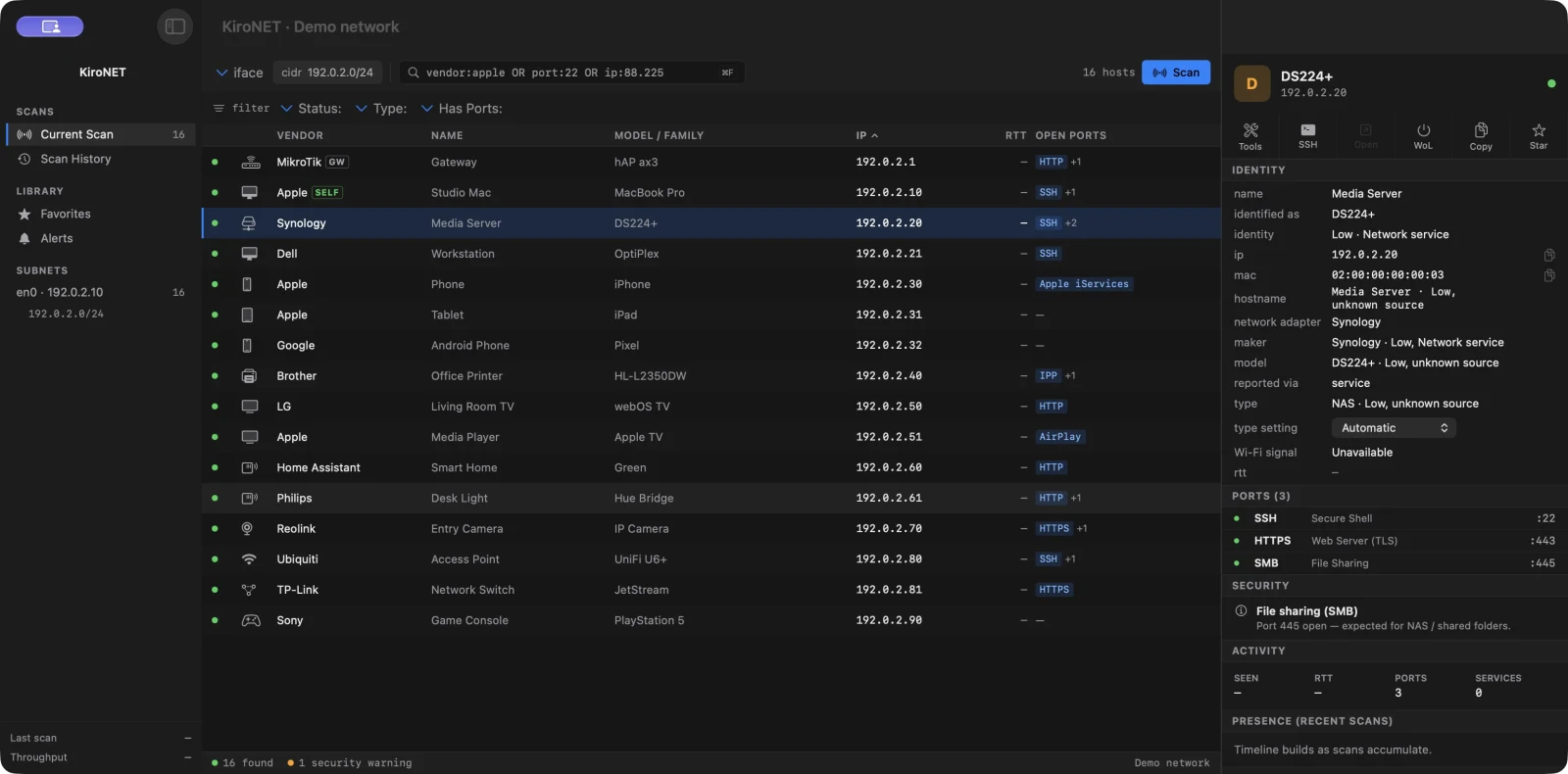
KiroNET scans your local IPv4 network from your Mac and shows the devices it finds, their likely models, open ports and services, with the source and confidence of every guess.
Free beta. macOS 14 or later, Intel and Apple Silicon. No KiroNET account.
Identifies devices from
MAC vendor (OUI) · reverse DNS · Bonjour · SSDP and UPnP · HTTP and HTTPS certificates · IPP · SNMP · ONVIF · NetBIOS · SIP · FTP, SSH, Telnet and SMTP greetings · Tapo, Kasa and Tuya discovery
Features
What KiroNET does
Names, models and ports in one list
Each detected device shows its name, likely model or family, response time and open ports. The scan checks 19 common TCP ports. Hover over a name or model to see where it came from and how confident KiroNET is.
See what changed on a device
KiroNET keeps up to 100 scan snapshots. Compare a device with its previous snapshot (same MAC, subnet and interface) to spot changes in IP address, name, model or open ports. When a MAC address is available, save favorites, custom names and notes.
Security findings with a suggested fix
The Security screen lists warning and critical issues for each device and for the DNS check, each with a suggested fix. Mark an accepted risk as Expected or export the report as Markdown or JSON. KiroNET adds an alert when a new issue appears or the gateway's MAC address changes. Treat findings as hints: they don't replace a vulnerability assessment.
Trace the path to the internet
The Network check pings your gateway, checks your DNS server and tests an external IPv4 address over ICMP or TCP 443. It also traces the route to that address. A private address at hop 2 points to likely double NAT. An address from 100.64.0.0/10 in the first five hops points to likely carrier-grade NAT at your provider.
It also compares your DNS server's answer for dns.google with the answer from 1.1.1.1. Two STUN servers, from Google and Cloudflare, show whether your NAT is symmetric. When your Mac has a public IPv6 address, the check also tests IPv6.
What the Network check flags
- Hop 2 is a private address
- likely double NAT
- 100.64.0.0/10 in hops 1 to 5
- likely carrier-grade NAT
- DNS answer shares no address with 1.1.1.1
- Security finding
- DNS answer is 0.0.0.0
- counted as blocked
- Two STUN servers see different ports
- symmetric NAT
An outage log for router, internet and DNS
Turn on Uptime, and while KiroNET is open it checks your router, the internet and your DNS server every 10 seconds. A part counts as down after three checks in a row without an answer. Each outage records which part failed, and the log stays on your Mac for 31 days.
Uptime
- Checks
- router, internet, DNS server
- Interval
- every 10 seconds while KiroNET is open
- Down after
- 3 checks in a row without an answer
- Log
- 31 days on your Mac
Tools for a single device
Scan a port range or all 65,535 TCP ports. Monitor a device over ICMP or a TCP port and see a chart of the last 600 checks and the share of missed answers. Check the HTTP status and TLS certificate of its web interface, or start SSH on devices that support it. Wake on LAN works when the device has a valid MAC address.
Wi-Fi around your Mac
See nearby networks, how busy each channel is and which one is least busy. KiroNET checks the security of the network your Mac is joined to and of access points that share its name. Network names appear only after you allow Location access.
Ask your AI assistant about your network
The built-in MCP server lets Claude Code, Codex, OpenCode and other MCP clients read scan results and history, start scans and run Device Tools. It stays off until you allow AI assistants in Settings, and it can't access app settings or saved credentials.
claude mcp add --scope user kironet -- '/Applications/KiroNET-HomeNetworkAnalyzer.app/Contents/MacOS/KiroNET-HomeNetworkAnalyzer' --mcp
Settings → AI Assistants → Connect a Client → Copy Command
Privacy
Local by default
Core discovery runs on your Mac. KiroNET needs no account and includes no advertising or analytics SDKs.
Read the privacy policy- KiroNET runs in the macOS App Sandbox and uses system network APIs. It doesn't run arp, nmap or privileged helpers.
- A RouterOS connection (for DHCP leases) and Fingerbank stay off until you add your own credentials, which KiroNET stores in the macOS Keychain.
- Fingerbank is a cloud identification service. When you turn it on, Fingerbank may receive device MAC addresses, hostnames, service types and UPnP server headers.
- The Network check and Uptime contact public Cloudflare and Google servers, such as 1.1.1.1 and 8.8.8.8, after you start them.
FAQ
Questions
Is the beta free?
Yes. The public beta installs through Apple's TestFlight app at no cost.
Which Macs does it support?
Any Mac with macOS 14 or later, Intel or Apple Silicon.
Why are some names or models missing or wrong?
Names and models depend on what devices and local network services report, so they can be missing or inaccurate.
Does it use a privileged helper?
No. KiroNET runs in the macOS App Sandbox. On first launch, macOS may ask you to allow Local Network access.
Can I scan any network?
KiroNET scans only the selected local IPv4 subnet, after you start a scan. Scan only networks you own or are allowed to inspect.
See what's on your network
The beta installs through Apple's TestFlight app and needs macOS 14 or later.
Join the TestFlight beta